GST is the part of restaurant billing that owners most want to hand to someone else, and the part that most often comes back as a notice. The rules for restaurants are not complicated, but the bill has to be right several hundred times a day, which is exactly what billing software is for. This guide covers the rates, the invoice, the traps, and how to set the software up so month-end is an export rather than an evening.
Rates and thresholds below are as of writing in 2026. Confirm the current notifications with your CA before changing what you print.
Which GST rate applies to your restaurant
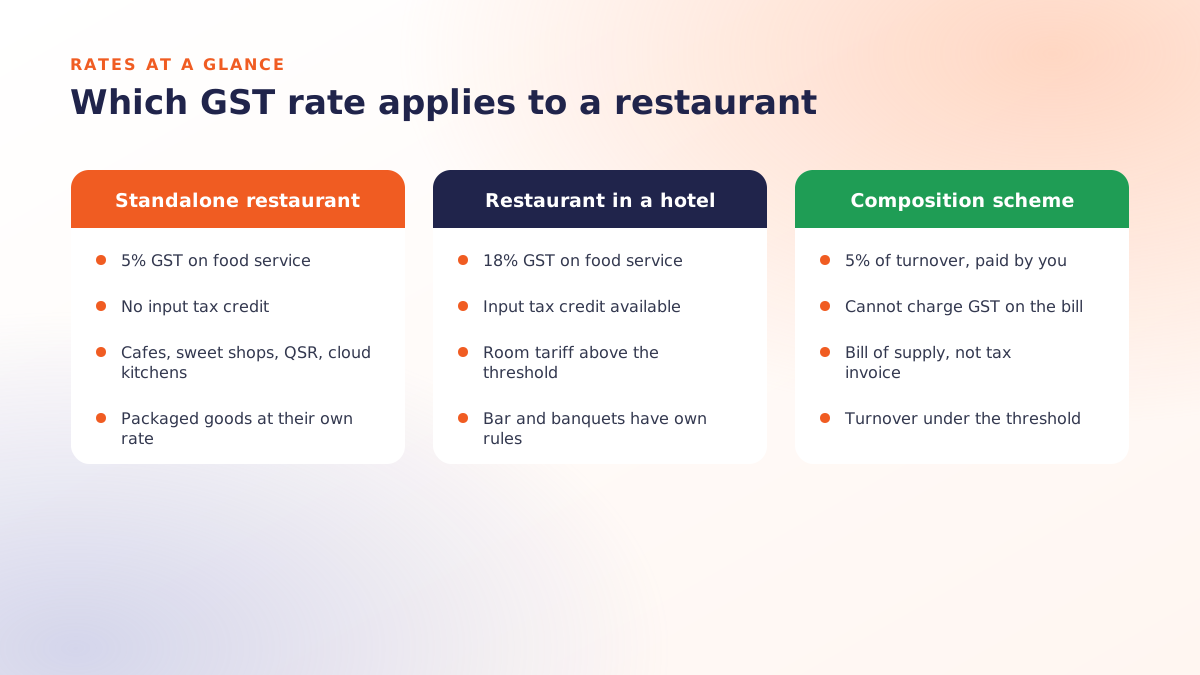
| Type of outlet | GST on food and beverage service | Input tax credit |
|---|---|---|
| Standalone restaurant, cafe, sweet shop, cloud kitchen, QSR | 5% | Not available |
| Restaurant inside a hotel with room tariff above the notified threshold | 18% | Available |
| Composition scheme (turnover under the threshold) | 5% of turnover, paid by the restaurant, not charged on the bill | Not available |
| Alcohol | Outside GST; state excise and VAT apply | n/a |
| Packaged goods sold as-is (bottled water, packaged snacks) | The product's own GST rate | As applicable |
Two consequences follow. First, because most restaurants get no input credit, GST on your purchases is a cost, and menu pricing has to absorb it. Second, one bill can carry more than one rate, which is why tax has to be set per item, not per bill.
Composition scheme: cheaper filing, one big rule
A restaurant under the composition threshold can pay a flat 5% of turnover with simpler quarterly filing. The rule that trips people up: a composition dealer cannot collect GST from customers. The bill is a bill of supply, not a tax invoice, and must say so. Printing "GST 5%" on a composition bill is the single most common mistake we see on new installations.
What a compliant restaurant bill must show
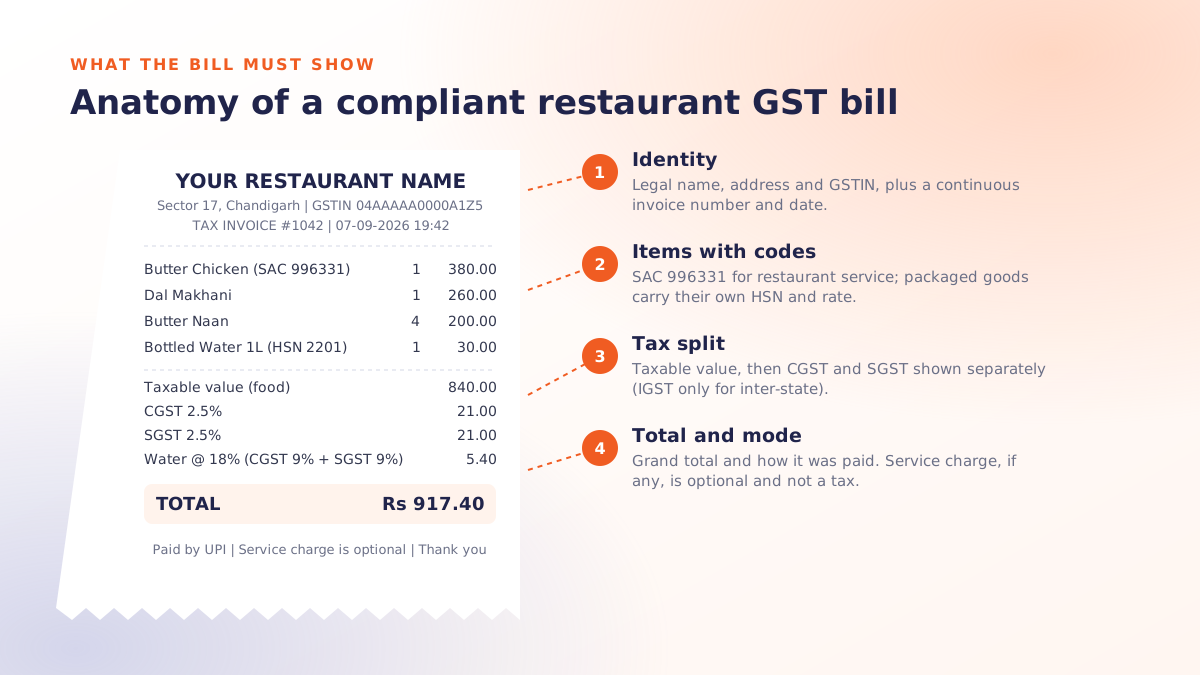
- Your legal name, address and GSTIN.
- An invoice number in a continuous series, and the date.
- The customer's name and GSTIN if it is a business order (B2B).
- HSN or SAC code: restaurant services fall under SAC 9963 (996331 for restaurant and cafe services); packaged items carry their own HSN.
- Each item, quantity, rate and taxable value.
- CGST and SGST shown separately (IGST for an inter-state supply, which is rare for restaurants).
- The total, and the payment mode.
A composition dealer replaces items 6 with the words "composition taxable person, not eligible to collect tax on supplies".
Aggregator orders: who pays
Since January 2022 the delivery platform, as the e-commerce operator, pays the GST on restaurant services ordered through it. That does not make those orders disappear from your books: the sale is still yours, the platform commission is an expense with its own GST, and your monthly statement from the platform has to reconcile with what your billing system recorded. Keep aggregator orders as a separate order type so the reconciliation is a report, not a search.
Service charge, discounts and vouchers
- Service charge is your levy, must be optional for the guest, and is not a tax. GST applies on the taxable value including any service charge actually collected.
- Discounts shown on the bill reduce the taxable value. Discounts given later, off the bill, do not.
- Vouchers and prepaid cards are taxed when redeemed, on the value of what was supplied.
The mistakes that turn into notices
- Charging GST on a composition bill.
- Applying 5% to a bottled drink or a retail item that carries a different rate.
- Two invoice series (one "official", one not). The series must be continuous and the totals must match the return.
- Serving on a KOT and never raising the bill. See why a KOT is not a bill.
- Filing from a register total that does not match the billing system's month, because someone edited bills after the fact without an audit trail.
Setting up billing software for GST
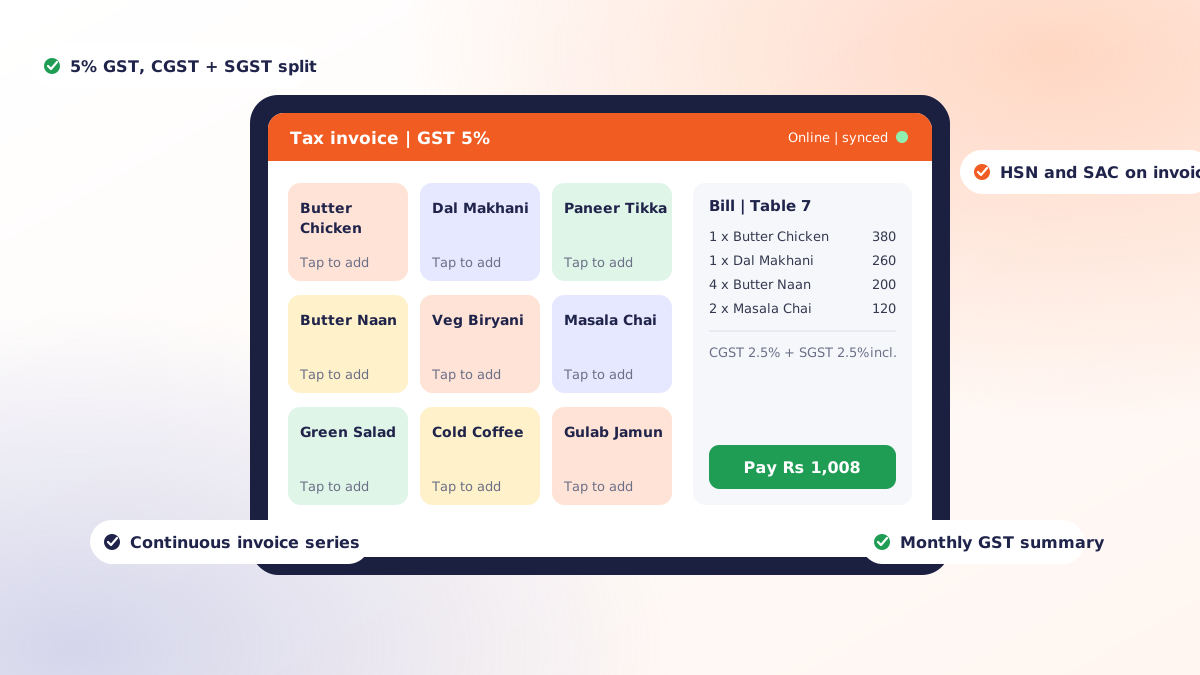
- Tax per item. Every menu item, packaged product and add-on carries its own rate. No bill-level tax.
- CGST and SGST split on the print. Check the printed bill, not the screen.
- HSN and SAC on the invoice. Set once per item group; the software should carry it onto every bill.
- One invoice series per outlet, continuous, no gaps, no manual numbers.
- B2B bills with a field for the customer's GSTIN so corporate orders are filed correctly.
- Composition mode, if that is your registration: bill of supply wording, no tax lines.
- Aggregator orders as their own order type, so reconciliation is a filter.
- Void and discount logs with reason and approver, so an edited bill has a trail.
- A monthly tax summary your CA can file from, exported, not re-typed.
Where Qmanja fits
Qmanja's restaurant billing software applies GST at item level, splits CGST and SGST on the printed invoice, carries HSN and SAC codes, keeps a single continuous invoice series per outlet, logs every void and discount with a name, and exports a monthly tax summary. It does all of that on the device, so a broadband cut does not interrupt compliant billing. For a walkthrough on your own menu and tax rates, book a free demo.
 Dine-In, In-Car, Delivery & Pickup
 Smart Billing & Tax
 KOT & Kitchen Workflow
 Inventory & Reports
 Fast Order Processing